Frequently Asked Questions (FAQ)
Frequently Asked Questions (FAQ)
Quick Links: Frequently Asked Questions
FAQ: Guitarocracy
- What is Guitarocracy?
- Is Guitarocracy suitable for kids and beginners of all ages?
- Can Guitarocracy help people who struggled with music in the past?
- What makes Guitarocracy different from traditional music lessons?
- How much practice time do I need to make progress?
- What musical skills can I learn with Guitarocracy?
- Is Guitarocracy good for adults who want to learn music later in life?
- Do I need to know how to read music to use Guitarocracy?
- How does Guitarocracy help people get started with music?
- Where is Guitarocracy’s Manual?
- Is there a Manual Download?
- What are the key features of Guitarocracy?
- What are the system requirements?
- Is Guitarocracy compatible with my DAW?
- How much does Guitarocracy cost, and how do I purchase it?
- Is there a demo?
- How do I install and set up Guitarocracy?
- Can I use Guitarocracy in commercial projects?
- Who created Guitarocracy?
- How can I get support or report issues?
- Does the visual fretboard work from a guitar input, or only a midi controller?
FAQ: Guitarocracy
Guitarocracy is a cutting-edge virtual guitar instrument developed by DO Studios for Native Instruments’ Kontakt Player. It bridges realistic electric guitar tones with intuitive music theory visualization, making it ideal for producers, guitarists, and composers. Launched in late 2025, it empowers users to create authentic guitar parts with features like smart arpeggiation, scale exploration, and production tools—all within your DAW or standalone with the Kontakt Player.
Guitarocracy is suitable for beginners of all ages, including kids, teens, and adults. Its interactive and rhythm-based approach keeps learning engaging while still building real musical ability.
Yes. Guitarocracy is built for people who previously struggled with music or felt discouraged. The platform focuses on small wins, clear progress, and practical learning methods that rebuild confidence.
Unlike traditional music lessons, Guitarocracy emphasizes rhythm and engagement before theory. It removes intimidation, avoids early complexity, and helps learners feel music first rather than memorize information.
Guitarocracy is designed so that even short practice sessions are effective. Many users see progress with just 10 to 20 minutes of focused practice, making it easy to stay consistent and motivated.
With Guitarocracy, users can develop essential musical skills such as rhythm, timing, tempo control, coordination, and musical awareness. These core skills apply to guitar and can transfer to other instruments and styles of music.
Yes. Guitarocracy is especially well-suited for adults who want to learn music at their own pace. The lessons are flexible, pressure-free, and designed to fit into busy schedules while still producing real musical progress.
No. Guitarocracy does not require users to read traditional music notation. Musical concepts are taught through listening, timing, and interaction, making it accessible for anyone interested in learning music.
Guitarocracy helps people get started with music by focusing on rhythm, timing, and structured practice instead of complex theory. The platform breaks music down into simple, repeatable concepts that build confidence and make learning feel achievable.
Ultra-Realistic Tones: High-fidelity electric guitar sounds sampled in detail for genres like rock, blues, metal, and more.
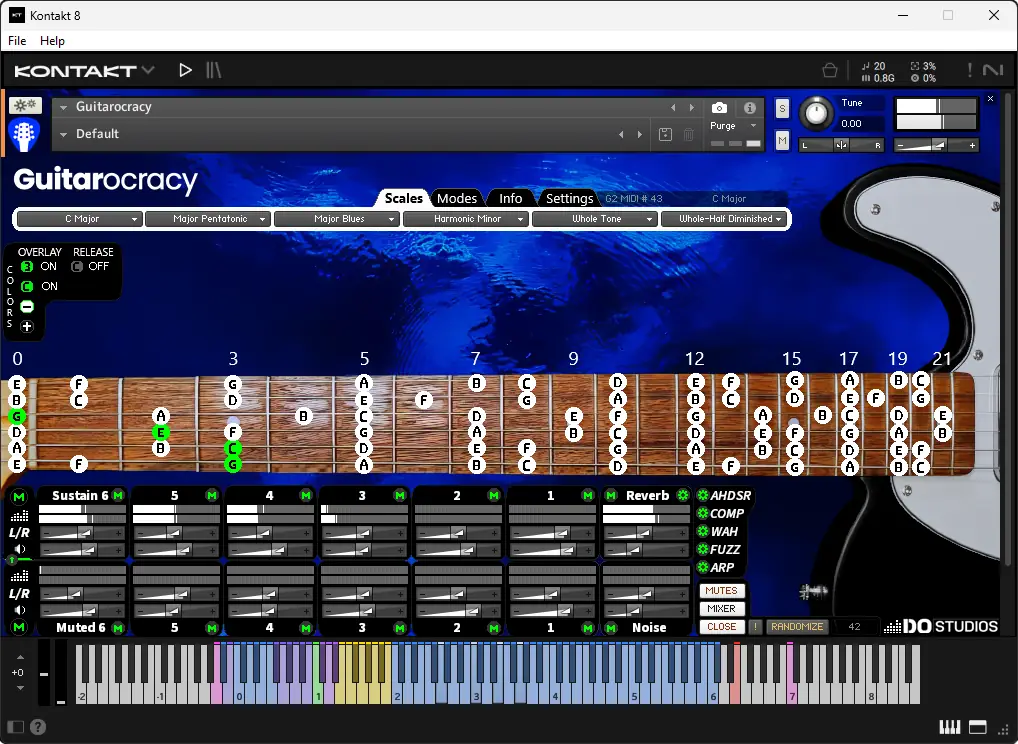
Smart Arpeggiation & Scales: Effortless tools for arpeggios and visualizing chord progressions, scales, and music theory on a virtual guitar fretboard by converting piano or MIDI data to guitar sounds and displaying note locations—perfect for guitar students, teachers and composers.
Production Powerhouse: Built-in effects, MIDI integration, and workflow enhancements to polish tracks quickly.
Guitarocracy runs on Native Instruments’ free Kontakt Player (version 8 or later). Minimum system specs include:
Windows 10/11 or macOS 12+ (Intel or Apple Silicon).
8 GB RAM (16 GB recommended for optimal performance).
2 GB free disk space.
A compatible DAW like Ableton Live, Cubase, Logic Pro, FL Studio, or others that support VST3, AU, or AAX plugins.
Download the free Kontakt Player or check Native Instruments’ Kontakt Player requirements for full details.
Yes, as long as your DAW supports Kontakt Player plugins (VST3, AU, AAX). It’s tested with popular DAWs including Ableton Live, Logic Pro, Cubase, Pro Tools, and Reaper. No full version of Kontakt is required— the free Player works perfectly.
Pricing details are available on our shop or order a license.
We accept major credit cards, Google Pay, Shopify’s Shop Pay, PayPal and Venmo for secure transactions.
Check out our YouTube demos (like the La Campanella by Franz Liszt and Mozart Sonata No. 16 C Major videos) for a taste of its capabilities.
After purchase, add your Guitarocracy serial key provided in your purchase email conformation to the Native Access application. Then install the library files and load them into the Kontakt Player. Detailed installation guides will be provided with your download. It’s straightforward—typically just a few clicks to get playing!
Absolutely! Once purchased, you have full rights to use Guitarocracy in your music productions, film scores, or any commercial work without additional royalties.
Guitarocracy was developed by DO Studios, founded to produce music and film projects in collaboration with other musicians and artists. The creator—a Texas-based musician, sound designer, and developer with over 30 years of expertise—developed it while working on a musical album for a film project. It evolved with help from the Native Instruments community, expert visual designer Michael Akins (who assisted with logo design), and several musicians/composers who tested Guitarocracy out and now integrate it into their current projects.
For questions, bugs, or feedback, use our contact form on the site. We’ll respond as quickly as possible.
The guitar visual fretboard is populated either by a midi controller, DAW midi data, or an audio to midi converter can also be used to connect a guitar audio output to the midi converter to display the notes in Guitarocracy. Guitarocracy can also be populated via the user scales selectors. Currently, there are over 200 built-in scales for users to select from. So, users can use the instrument as just an instrument or you can use the fretboard visualizer to practice new scales or modes or learn new songs via a midi track or midi controller.